



The Swollen Pouch in the Basement Workshop
I unscrewed the back plate of an old ThinkPad T480 on my basement workshop desk last November with a small magnetic screwdriver. The machine belonged to an accountant in downtown Chicago who had kept it docked to a dual-monitor stand in his office for nearly three straight years. When I pulled the bottom cover off, the black lithium battery pouch had swelled up so much it was putting pressure against the underside of the trackpad. The laptop had only clocked 114 battery cycles in three years, yet its runtime off the charger was barely thirty-five minutes.
That battery didn't die of old age or heavy road travel. It died because millions of people make the exact same quiet mistake every night before they climb into bed: they plug the charging cable into the wall, shut the lid, and leave the cells baking at maximum voltage for eight hours straight.
The Illusion of the 100% Fuel Tank
Here is the routine almost everyone falls into. You wrap up your work, close Netflix, grab that heavy USB-C cord off the floor, and plug it straight into the side of your machine before turning the lights out. By one or two in the morning, that little battery symbol is sitting at a solid one hundred percent. The charge controller cuts off the heavy flow of electricity, and the little amber light on the chassis turns solid white. You think everything is peaceful and off. But under the aluminum keyboard deck, those lithium-ion pouch cells are trapped in a state of continuous physical and chemical tension until you unplug them at breakfast.
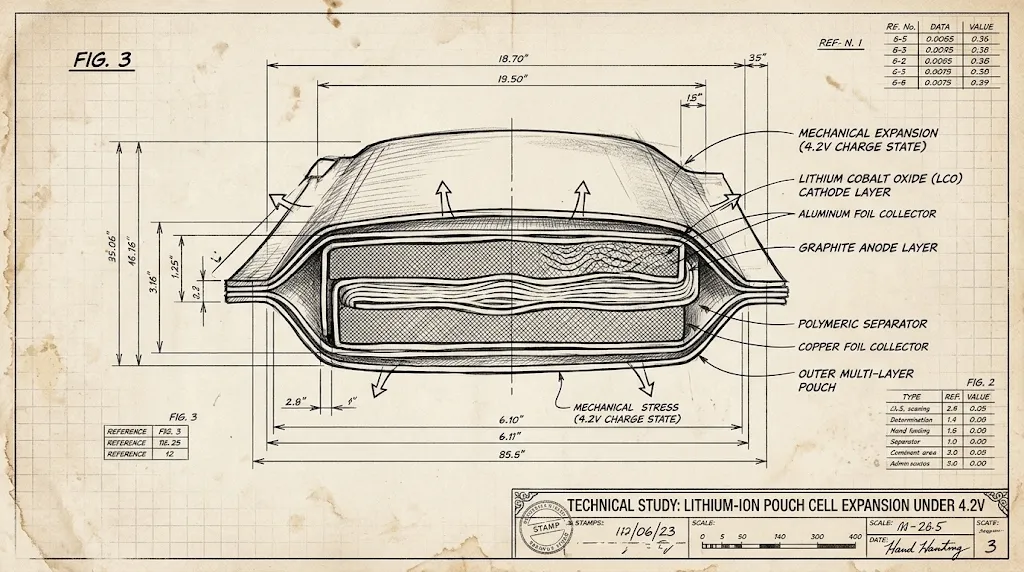
Except batteries aren't metal tanks. A battery is a sealed chemistry experiment wrapped in delicate foil pouches. When a lithium-ion battery sits empty, the lithium ions rest comfortably inside the cathode, which is usually made of a lithium cobalt oxide blend. When you plug that USB-C charger into the wall, electric current forces those ions to leave the cathode, swim across a liquid electrolyte bath, squeeze through a microscopic porous separator, and shove themselves into the anode, which is built from layers of graphite sheets.
By the time the screen says 100 percent, that second side has no room left. Every single lithium ion has been jammed into the graphite matrix like commuters packed into an overloaded subway car on a humid Friday afternoon. In battery chemistry, this mechanical jamming causes the microscopic graphite structure to physically expand by roughly ten percent. Leaving a laptop battery at 100 percent overnight means keeping that microscopic lattice under continuous mechanical strain for seven or eight hours every single day.
Voltage Strain and Chemical Degradation
Most folks look at the percentage bar at the top of their screen like a fuel gauge in a car, but lithium chemistry runs purely on cell voltage. A battery is not a container that gets physically filled with fluid; it is an electrochemical system whose internal voltage changes depending on how many ions are crowded together at one end.
Leaving a lithium cell at 4.2 volts all night is the chemical equivalent of keeping a steel guitar string tuned two steps above pitch. It won't snap instantly, but structural fatigue accumulates silently every single hour.
When you run a battery until the screen cuts black, that cell sits right around 3.0 volts. At that point, the chemical structure is completely relaxed, but the machine will not turn on because the voltage is too low to drive the computer's motherboard circuits. As the charger pushes energy into the cells, that voltage climbs steadily up through 3.7 volts, 3.85 volts, and all the way to 4.20 volts per individual cell at full saturation.
At 3.85 volts—which is around half-full—the cell feels almost no physical stress. The chemical bonds inside the cathode and the anode are relaxed and balanced. But as soon as that charge controller forces the voltage up past 4.10 volts toward that maximum 4.20-volt ceiling, the delicate liquid electrolyte begins to break down. Microscopic oxidation reactions trigger on the surface of the cathode, releasing tiny trace amounts of gas. Over hundreds of nights, those tiny gas emissions accumulate, slowly puffing up the outer foil pouch like a silver popcorn bag in a microwave.
| Charging State | Cell Voltage | Internal Stress Level | Typical Useful Lifespan |
|---|---|---|---|
| Stored at 50% | 3.85V | Minimal baseline stress | 5 to 6 years (1,500+ cycles) |
| Capped at 80% | 4.05V | Moderate, sustainable | 3 to 4 years (1,000+ cycles) |
| Saturated at 100% (Overnight) | 4.20V | High chemical & mechanical strain | 1.5 to 2 years (~350–500 cycles) |
| High Heat + 100% Saturation | 4.20V+ | Critical (Pouch swelling risk) | Under 18 months |

The Fatal Recipe: Peak Voltage Combined with Parasitic Heat
Leaving the battery sitting at peak voltage wears it out, but heat makes it happen twice as fast. Chemical reactions speed up dramatically with every ten degrees Celsius of temperature increase. If you leave a laptop in a cool 65-degree bedroom on a flat wooden desk, that 4.20-volt saturation will degrade the cell capacity slowly over several seasons.
I noticed this firsthand with my work laptop two winters ago. I would close the lid around midnight, slide the machine into a snug padded felt sleeve on my bedside table, and leave the factory 65-watt charger plugged into the side port. When I pulled the laptop out in the morning, the aluminum underside was warm to the touch. Even in sleep mode, modern Windows laptops run background maintenance tasks: checking for operating system updates, syncing cloud drives, indexing local files, and refreshing network certificates. That faint parasitic drain draws power, which warms the battery pack, which makes the charger pump in short bursts of top-up trickle current right when the cells are most vulnerable.

My buddy Dave brought his MacBook Air to my house last summer because he noticed the trackpad wouldn't click properly anymore. The lower edge of the trackpad was physically bowed upward by nearly two millimeters. When we popped the bottom case screws, the three-cell battery pack looked like a row of miniature black pillows. Dave works as a freelance graphic designer and admitted he had never unplugged the MagSafe adapter from his desk for fourteen months straight. The combination of intense rendering heat and constant 100 percent float voltage had permanently delaminated the electrode layers.
How Modern Hardware Engineers Fix the Overnight Problem
On my own ThinkPad, I remembered an old IT trick. I opened up Lenovo Vantage on Windows, clicked over to the battery power settings, and turned on the charging threshold feature. I set the laptop to stop accepting charge whenever the battery hits 80 percent, and only start charging again if the battery drops below 75 percent. Apple introduced an equivalent feature called 'Optimized Battery Charging' in macOS, which learns your daily sleep routine and halts the charging at 80 percent throughout the middle of the night, only topping up that final twenty percent twenty minutes before your morning alarm rings.

When you flip that switch, the charging circuit tells the battery: stop at 4.05 volts. That tiny difference—just 0.15 volts per cell below the absolute maximum ceiling—drops the chemical oxidation rate by more than sixty percent. The graphite anode layers never experience that destructive ten-percent mechanical swelling, and the liquid electrolyte remains stable for years rather than months.
Flipping that setting took me maybe forty seconds on a Tuesday afternoon. Three years later, that same ThinkPad still holds ninety-four percent of its original factory design capacity. If you take thirty seconds tonight to dig into your machine's battery settings and set an 80 percent ceiling, you will never have to unscrew a swollen, warped aluminum chassis in your basement.